Product engineering
Why we built an AI assistant that never sees the cloud
Bookkeepers and NDIS providers want AI's help with client documents, but pasting them into a cloud chatbot is a privacy problem. So we built one that runs on your own computer.
Talk to enough bookkeepers, BAS agents and NDIS providers and you hear the same quiet confession: "I paste things into ChatGPT. I probably shouldn't."
Supplier invoices with bank details. A client's BAS workings. A participant's progress notes. The tools are genuinely useful, the work is relentless, and the privacy question gets pushed to the back of the queue.
We think that's the wrong trade to ask people to make. So we built the alternative: an AI assistant that runs entirely on your own computer.
The problem with "just use the cloud"
Cloud AI tools aren't careless. The issue is simpler: the moment a document is uploaded, it has left your control. It sits on someone else's servers, often overseas, under someone else's retention policy.
For most people that's a reasonable trade. For some professions it's a real problem:
- Tax and BAS agents have a duty of confidentiality under the Tax Practitioners Board's Code of Professional Conduct: client information isn't disclosed to a third party without the client's permission.
- NDIS providers hold health and disability information, which the Privacy Act treats as sensitive information, with stricter rules on how it's handled and disclosed.
- The OAIC's own guidance on commercially available AI products recommends, as a matter of best practice, that organisations don't enter personal information, and particularly sensitive information, into publicly available generative AI tools.
None of this means AI is off-limits. It means the safest place for the AI to do its work is where the documents already are: on your desk.
Why this is possible now
Two years ago, a model small enough to run on a laptop couldn't reliably read a scanned invoice. Today it can. Open models such as Google's Gemma now run well on an ordinary Mac or Windows PC, with no data centre involved.
They aren't magic. On a computer without a graphics card, reading a scanned invoice can take a few minutes rather than a few seconds. We tell people that up front, and the app says so while it works. But for a bookkeeper processing a pile of bills, "a few minutes, privately, while I do something else" beats "instantly, on someone else's server".
How it works
We designed it around how bookkeepers actually process bills:
- Drop documents in: PDF invoices, scanned bills, even a phone photo of a receipt. Or point it at a folder, and new files are picked up automatically.
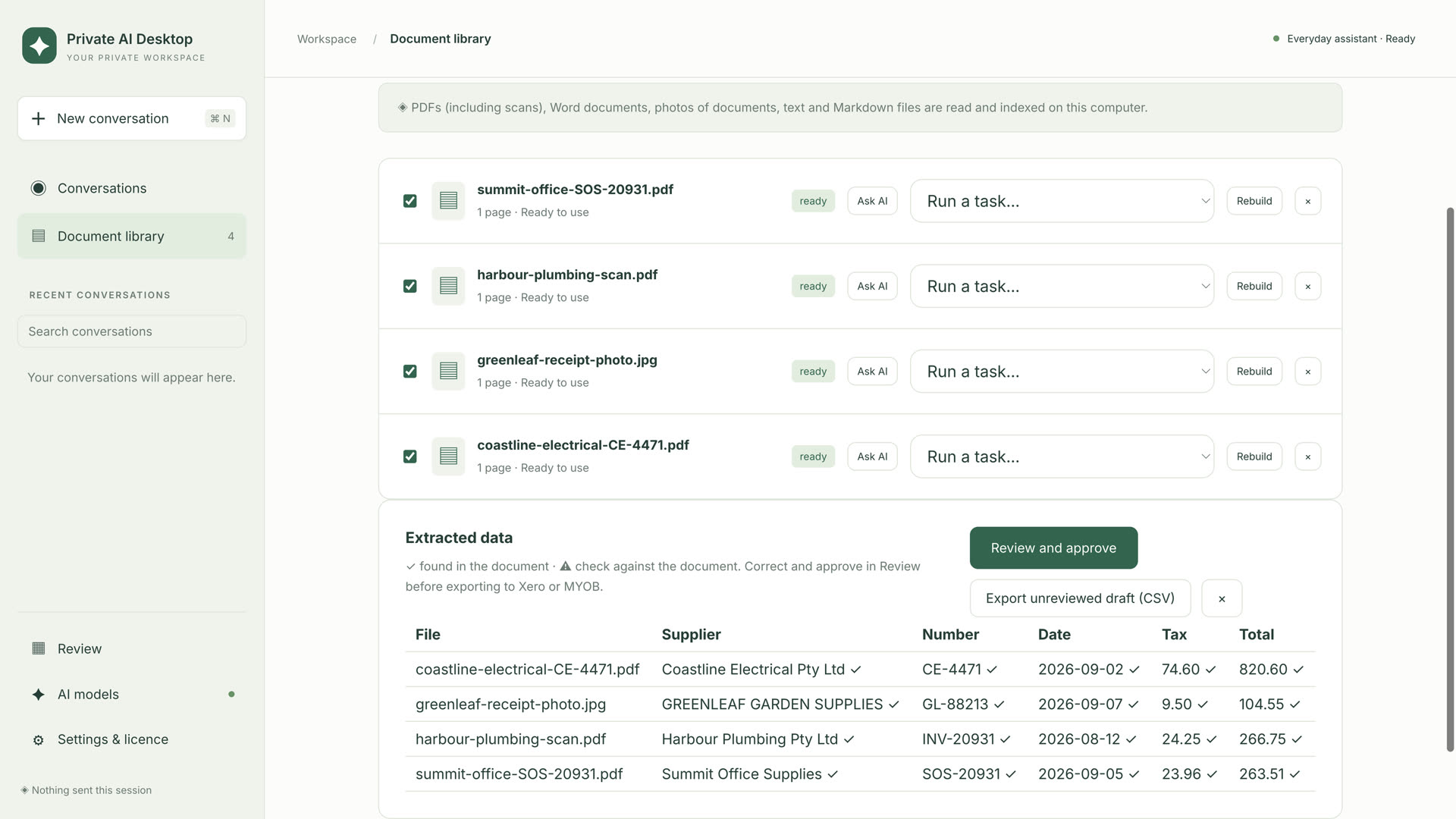
- It reads them on your computer: supplier, ABN, invoice number, dates, GST and totals.
- It shows what to trust. Every value is marked either found in the document or check this. ABN check digits are verified, and if the value it read is wrong but a valid ABN is printed on the invoice, it offers that instead.
- You review and approve. Flagged values sit beside the original document. Flagged bills can't be bulk-approved by accident.
- Approved bills are exported as files ready to import into Xero or MYOB. Only approved bills, and only exactly what you approved.
For NDIS providers and plan managers, the same engine checks each invoice line against the NDIS price limits for its date and location, and turns a support worker's rough shift notes into a structured progress note. Anything that isn't in the original notes is left out, not made up.
You can also just ask questions about your documents in plain English. Every answer shows the passages it came from, and says so when the answer isn't there.
"Don't trust us. Check."
Privacy claims are cheap, so we tried to make ours verifiable:
- The app counts its own network requests. The internet is used to download the assistant once, check your licence and check for updates. Your documents, chats and prompts stay on your computer, and the counter is there for you to see.
- Accuracy is measured on your documents, not our marketing. The app keeps a running accuracy report based on the bills you've reviewed: how often a value was right, and how often a flag was a false alarm. The report contains counts only, never names or amounts, so you can share it if you choose.
We'd rather you believe the numbers from your own work than any figure we could put on a website.
Who it's for
We're starting with two groups:
- Bookkeepers, BAS agents and small businesses processing supplier bills into Xero or MYOB.
- NDIS providers and plan managers checking invoices and writing progress notes.
It runs on Macs with Apple Silicon and on Windows 10 and 11.
Founding trials are open
We're working closely with a small group of early users before general release. Founding trials are free for 35 days and include a personal install call, and founding customers keep their price for life.
If you'd like one, or you know a bookkeeper or NDIS provider who's been quietly pasting documents into a chatbot, request a founding trial. You can also watch the short walkthrough on the products page.
AI should work for you, not the other way round. On your desk, on your terms.